


- Open
- Severity: Critical
- Game Area: Other
Description
I am experiencing the same potential bug that has been posted on Steam approx. 2 years ago: https://steamcommunity.com/app/2229890/discussions/0/4361249719399968917/
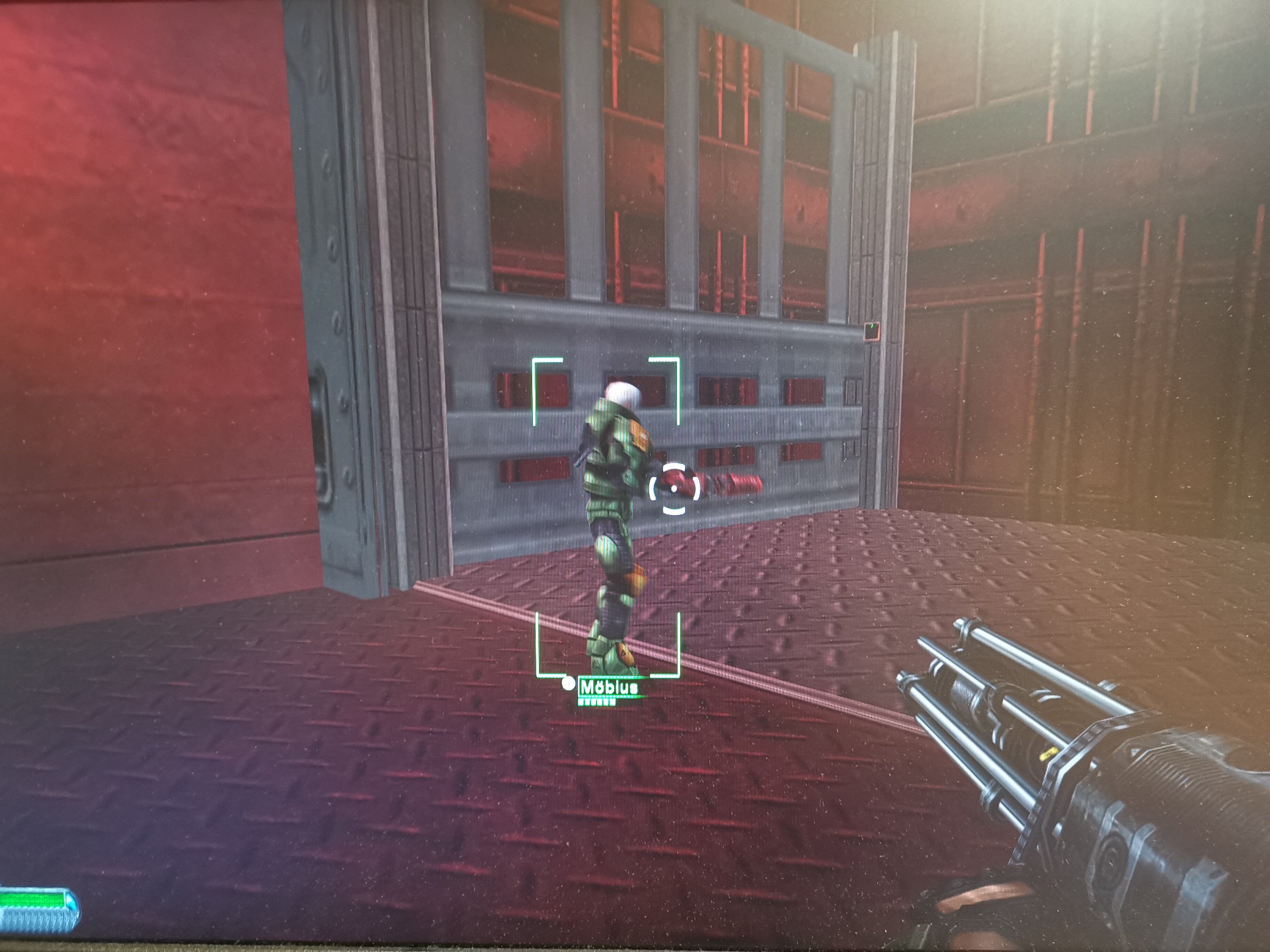
I'm doing single player mission "Brains not Brawn" (=Escort Moebius to the surface) and I have gotten as far as the large freight elevator (in the tunnel with the wrecked truck). However, Moebius can't get into the elevator - I myself need to jump for some reason to get onto the lift floor, but the doctor just gets stuck (see attached image).
Can you script something to make Moebius jump? Or lower the platform just a bit more so that he does not have to jump but can simply run on it?
I really would like to continue Havoc's mission 
Reproduction Steps
- Saved progress before entering the above mentioned tunnel
- stepped onto the platform myself and watched Moebius following behind
- waited a loooooong time to see whether, finally, Moebius would make it onto it, too (but failed)
- while (myPatience > 0) { reloaded(); retried(); cursed() }
Attachments
Attachments:
Recommended Comments
Join the conversation
You can post now and register later. If you have an account, sign in now to post with your account.
Note: Your post will require moderator approval before it will be visible.