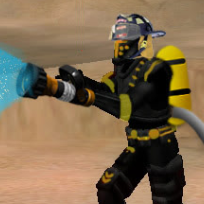
February 16, 201511 yr Author: Oblivion165 Skill level: 1 Proxies are probably my favorite thing in renegade. They make things a whole lot more stream-line and if you do your business right, you can make your maps load everything you need! -------------------------------------- 1. First off open your terrain, or make some. 2. Make a 1x1x1 Box somewhere on the terrain. 3. Make your box into a point at the X axis. Seen below Now name it "GDI Spawner~00" ~01 ~02 and so on for more than 1 spawner (The X axis is generally the "Front" Direction of many westwood models, including the player models) 4. Export as renegade terrain. PROXIES TO MY KNOWLEDGE ONLY WORK IF YOU EXPORT AS RENEGADE TERRAIN. Now make your terrain in LevelEdit and a GDI Spawner will be where you placed the proxie in Gmax! 5. Now make sure your spawner isnt touching anything like you normally would. As you can see his foot is in the sand. A Great Mapping Technique This is a really good idea to do when making maps. First go through the building controllers and make temps with shorter names. (Alot of them are longer than 16 characters long, Renx wont export it correctly) Go back to your terrain and do like you did with the spawner Now your building controllers will load with the map!!! You wont have to touch a thing! This works with just about everything, you can load tiberium fields, gun spawns, trees, PCT Zones, Bots, all sorts of things. Now when you have all your temps made, make a copy of the Temps in your mod folder, so when you start a new map, paste them in and its all ready to go.


Join the conversation
You can post now and register later. If you have an account, sign in now to post with your account.
Note: Your post will require moderator approval before it will be visible.