


Jeod
Forum Game Masters
-
Joined
-
Last visited
Everything posted by Jeod
-
[Meta] One of my favorite parts of this game is that the dead doc has no spoilers so it's just as much a discussion as the live thread. It's going to be quite the long read by the end of this game.
-
DAY THREE ChopBam was killed last night. He was Drax the Destroyer and town. RIP in pepperoni. Things appear to be getting more dangerous. If you want to ensure this timeline is the one where you win, you better plan carefully...day ends in 50 hours!
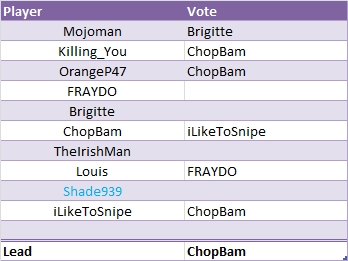
 Oh I have an appreciation for it alright...I'm still missing a few PMs. I can start the day off within 30 minutes of receiving them. That said, if you've already sent your actions in and want to change them, now's the time to do so.If the right conditions are met, you definitely will be. 15 days until Endgame.Oh, in my hurry to end the day I forgot something crucial. The infinity stones let out a pulse of energy! Some game conditions may have changed as a result.Everyone gathers around ChopBam to lynch him--how dare he use the infinity stones for such nefarious purposes! Alas, before you could find out his alignment, he's suddenly nowhere to be found! ChopBam is unable to be lynched! NIGHT TWO You know the drill. Two nightposts and all.Hammertime.Just got home, but won't be able to count the votes up in time to provide a CvC before hammer.An hour and 45 mins.I’ll upload my data to sheets tonight.I wish but I’m not home yet.Action resolved, please resume.Resolving an action, standby.If you guys wouldn’t mind tracking the CvC, I don’t have my excel sheet with me at work.Hello there, here's a short guide to get connected to our IRC channels! 1. Get an IRC client. I use Hexchat personally, but there are a lot of options. mIRC is one of the more popular ones. 2. Connect to rencorner by typing /server irc.rencorner.com -- You may wish to autoconnect, look around in settings for this option 3. Type /join <channel> by replacing <channel> with the following: #w3dhub-apb (A Path Beyond) #w3dhub-ecw (Expansive Civilian Warfare) #w3dhub-tsr (Tiberian Sun Reborn) #ikmaps (Interim-Apex -- this channel was called Imperial Kaskins Maps before the official IA name was conceived) 4. Protect your IRC nickname by registering it. In the rencorner channel or any other channel, type /ns register <password> <email> and replace password with a password you'll remember, and email with your email address or a throwaway. Once you register, you'll be asked to identify yourself each time you connect to IRC. Just type /ns identify <password> to do so. If you're using HexChat, you can click HexChat -> Network List -> Edit button for Rencorner and add a Connect Command to do this for you on startup.
 Alright, we're back! It doesn't look like the CvC has changed, remind me if you voted/unvoted. Since the day started early, there will be no extension. Hammer is in 11 hours! Keep in mind that I may not be able to resolve day actions until hammer due to work.
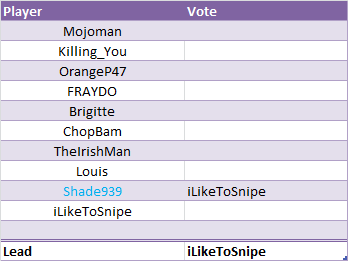 No new CvC needed? Neat. Checking in on lunch.#goodreadsDone.
 Works for me.
 Okay, now that I'm home, I'll make it official. Shade939 reveals himself as the town aligned Yondu! Has anyone kept track of the CvC? I really don't want to go back through 5 pages of shit-flinging.



Account
Navigation
Search
Configure browser push notifications
Chrome (Android)
- Tap the lock icon next to the address bar.
- Tap Permissions → Notifications.
- Adjust your preference.
Chrome (Desktop)
- Click the padlock icon in the address bar.
- Select Site settings.
- Find Notifications and adjust your preference.
Safari (iOS 16.4+)
- Ensure the site is installed via Add to Home Screen.
- Open Settings App → Notifications.
- Find your app name and adjust your preference.
Safari (macOS)
- Go to Safari → Preferences.
- Click the Websites tab.
- Select Notifications in the sidebar.
- Find this website and adjust your preference.
Edge (Android)
- Tap the lock icon next to the address bar.
- Tap Permissions.
- Find Notifications and adjust your preference.
Edge (Desktop)
- Click the padlock icon in the address bar.
- Click Permissions for this site.
- Find Notifications and adjust your preference.
Firefox (Android)
- Go to Settings → Site permissions.
- Tap Notifications.
- Find this site in the list and adjust your preference.
Firefox (Desktop)
- Open Firefox Settings.
- Search for Notifications.
- Find this site in the list and adjust your preference.