
Leaderboard
-

Category5
VIPs2Likes5,037Posts -
moonsense715
Admins2Likes5,442Posts -

Pyryle
Staff Moderators1Likes347Posts -
Silverlight
Staff1Likes183Posts



Popular Content
Showing most liked content on 08/02/2018 in all areas
-
2 likes
-
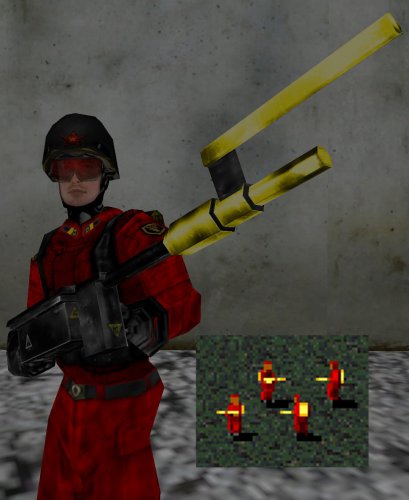 COMPATIBLE WITH LATEST A PATH BEYOND RELEASE! Texture pack last updated 2026/09/10 for Delta's 3.8.1.0 release. See changes/additions below. All content featured in this texture pack should be compatible with the most current/recent patch of Red Alert: A Path Beyond. Enjoyed playing Red Alert? Ever wanted to play Red Alert: A Path Beyond with faction colors? Then this texture pack is for you! The textures contained in this pack will colorize the characters and vehicles of APB to represent their house colors from the Red Alert RTS. Allies will have the following house colors: Blue, teal, green, desert/sand Soviets will have the following house colors: Red, orange, yellow, brown When choosing a unit that has multiple camos, the symbol on the upper left of the purchase icon will tell you which color you will be buying: http://i.imgur.com/Dn0Qn0v.jpghttp://i.imgur.com/qH5MdM8.jpg UPDATES FOR DELTA 3.0 - 2016 (click on the spoiler below to view!) UPDATES FOR DELTA 3.0.6 - 2016 (Click on the spoiler below to view!) UPDATES FOR DELTA 3.1 - May 2017 (click on the spoiler below to view!) UPDATES FOR DELTA 3.2.2 - June 2018 (click on the spoiler below to view!) UPDATES FOR DELTA 3.2.3 - July 2018 (click on the spoiler below to view!) UPDATES FOR DELTA 3.6.1.0 - November 2021 (click on the spoiler below to view!) UPDATES FOR DELTA 3.8.1.0 - September 2026 (click on the spoiler below to view!) INSTALLATION Unpack the contents of the ZIP file into the game's "data" folder. For reference, the installation path should be the following: Once unpacked, load up APB and play like it's 1996 all over again! Special thanks to V0LK0V and Kicken for the original idea of the classic colors pack. Without them, this texture pack would not have existed for this long.1 like
-
1 like
-
1 like
-
1 like