

ChopBam
-
Posts
5,453 -
Joined
-
Last visited
-
Days Won
209 -
Donations
0.00 USD
Content Type
Profiles
Forums
Events
Documentation
Bug Tracker
Downloads
Everything posted by ChopBam
-
We'll be seeing some more activity on the Reborn server very soon. Bot support won't be far behind, and this can help keep the server active with lower player counts, similar to APB. Perhaps someone can do this, and in fact I've seen some things in the works lately that appear to be along these lines. This was thought of quite a few years ago and we all want to see it happen, but nothing has been officially started on it. There are co-op maps in the works that are higher priority such as two dedicated co-op maps for APB that are works-in-progress. It's been a common idea that using official missions from the games is a great way to pool for co-op ideas.
-
Way ahead of you on that one.
-
Thanks for your interest! Those are interesting points about APB and Reborn polish. Single player modes may not work so well for our development environment as the time spent by our very small development team to build single player story, campaign, and missions would go towards people playing it once or twice and then being done. Co-op is a bit better as you can still get story and objectives out of a mission while retaining the replayability inherent to multiplayer games. I have ideas for a couple co-op maps but there is nothing set in stone and certainly no co-op mode planned for next week's release, unfortunately. But it wouldn't be too hard beyond that date to get something together like the co-op mode against bots on the regular MP maps we see on APB's server.
-
3.6.4.2 Changed "Suicide" button text to "Respawn - Forfeit Credits". Added kill icons for ghosts. Soviet ghosts have been made uncrushable. New Game Host Controller Added "Game Host Controller", which is deployed from a secondary weapon on the "d" character. This is meant for moderators to use with the newer coop server game modes such as Infection. Removes all defenses on the map. Gives all buildings massive "ConYard" health boosts each second, to help prevent non-flare base destruction. Removes point/credit bonuses from damaging buildings. Ore Truck Upscaled the texture so it appears higher quality. Map Adjustments Bonsai: Fixed a stuck spot between the Soviet War Factory and Refinery. Complex: Blocked bots from trying to drive through the center hedgehogs. NorthByNorthwest: Fixed a couple stuck spots between rocks north of both bases. RidgeWar: Hanging out on the ridge west of the Soviet base is now dangerous (potential exploit spot). SwampOfIllusions: Replaced "Underlying Thoughts" in Jukebox with new soundtrack "Groundwire Cinematic Remix"
-
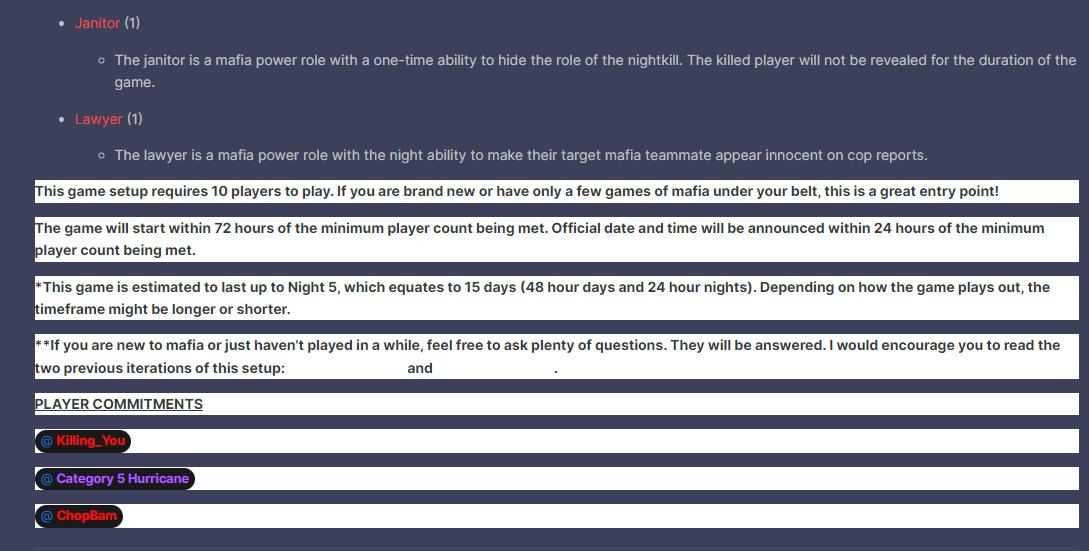
Paste it in plain text.
-
It's ugly as f*ck and hyperlinks are completely invisible unless you hover over them or drag select the text.
-
I'm down to join! Now for the love of god, fix your post formatting.
-
Not sure. Up to you.
-
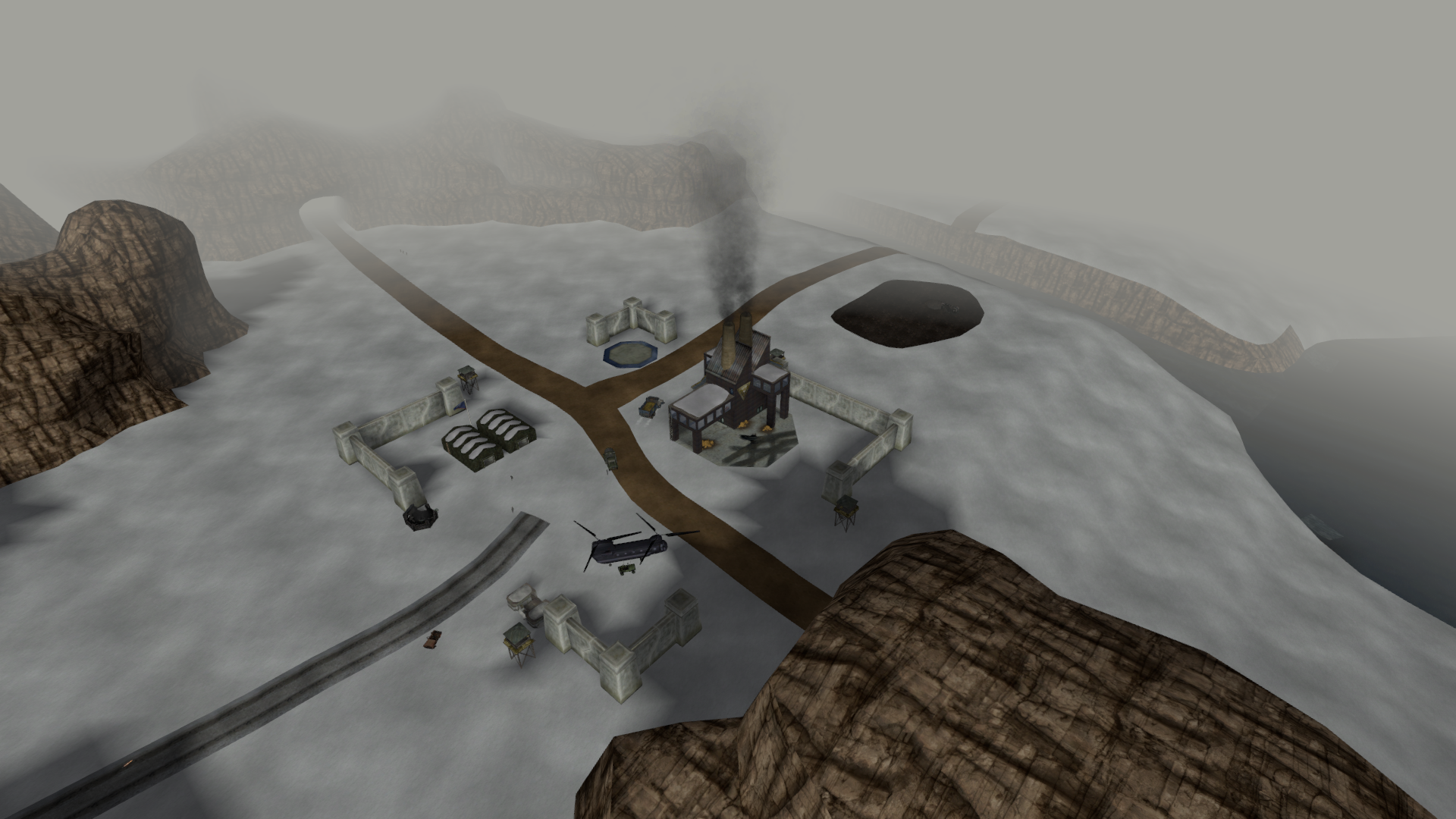
Not sure about the missing stuff, the current team doesn't really offer support for Beta, so you'd be best asking Einstein maybe for those files (as Nodlied suggested). You can have a sneak peak; be aware it's still quite early in terms of visual development. Here's the SS I have on the Trello card, so it's meant to be more of a "this is THAT map" and not really meant to be promotional material. Still, you asked so you shall receive. :D
-
Try this guy. As a note, we've had a version of this map in development hell for the modern version of APB, coming Soon™️ near you. RA_Soviet_Invasion_Coop.mix.7z
-
Command and conquer renegade had every text replaced with TDBERR
ChopBam replied to chill AX2's topic in Help & Support
I suspect something messed up or removed your strings file. Have you tried reinstalling the game? -
Changed Status to Fixed
-
***To developpers:Toggle crouch/Run for Vanilla RG***
ChopBam replied to LT777's topic in Red Alert: A Path Beyond
Scripts 5.0 and 5.1 are versions of scripts that ship with newer W3D games than Renegade, such as RA: A Path Beyond, RA2: Apocalypse Rising, and Battle for Dune. -
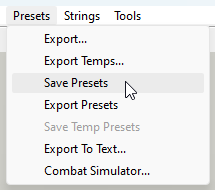
Those handy presets at the right side that weren't showing up before and are showing up now--expand the folder Munitions, and then you'll find the various Ammo, Explosion, and Weapon presets inside their respective folders. You can double click on a preset to edit its settings. To save, go to Presets --> Save Presets (same thing I shared above in a screenshot). You could also Export presets if you want to test it in game. What these functions do is generate a new objects.ddb for you. It will need to be in the game's data folder to have any effect, and naturally its presence will make your game incompatible for online play in the official servers. It is of course also possible to edit them for custom maps and then you wouldn't need to edit objects.ddb.
-
How are you converting them for use in Mammoth? There's no .lvl file in the .mix files. The only way I know of is using the ancient LevelRedit program and as far as I know that hasn't worked for many years. In any event, only the example level files are supported for public use in the SDK, for now. No, they're stored in the global presets.
-
@ LeonardMT I got the levels working on my end of the SDK and have pushed the update to GitLab. Is that something you can try downloading again and see if loading the levels works for you now?
-
Hey Leonard, I'm actually experiencing the same problem if I open the example .lvl files using the SDK Mammoth. I suspect it's related to the JSON revamp that took place within the last couple years, which completely changed how the database files are read and stored. This was never truly tested with the SDK, so we'll be looking into it and pushing a solution once we find it. Thanks so much for pointing it out!
-
Yes, the website was down for some maintenance. We apologize about the downtime and thank you for your patience. It should be back up now.
-
This indicates to me that Mammoth isn't hooked up to your game install properly, which is why I asked about the mammothpath. If that path is correct, I'm not sure what the problem is..
-
***To developpers:Toggle crouch/Run for Vanilla RG***
ChopBam replied to LT777's topic in Red Alert: A Path Beyond
Renegade runs on Scripts 4.x. Toggling crouch, sprinting, and UI scaling are features of Scripts 5.0. It would need to be approved and backported by the coding team, which as far as I'm aware is unlikely to happen. -
This sounds like a very strange issue to me. Before you open any levels, do you see the presets listed on the righthand side? (the objects inside the folders)
-
When the mammothpath is pointing to the correct game installation folder, the program always runs fine for me otherwise out of the box. Unfortunately I'm unable to look at crashdumps, but maybe someone else on the team can. Can you perhaps post here what the "GamePath" actually is in your mammothpath ini file? Maybe a bit off topic but why do you put a folder called a-path-beyond-sdk-master inside another folder titled a-path-beyond-sdk-master..?
-
You crashed using file/open? Did Mammoth work properly before applying this .bat file? It looks like at the very least you haven't built a json database yet. Does the path in your mammothpath.ini point to the APB installation you wish to pull from/push to?
-
3.6.4.1 Just a small update this time. Vehicles Mobile Artillery has improved hitboxes. Its texture has also been touched up further. Submarine death uses proper Attack Sub model. MiG smoke trail lifetime cut in half (performance improvement). Minor Map Adjustments RA_AS_Seamist: Added a few emitter effects at the destroyed Allied Refinery. RA_AS_Seamist: Fixed a lighting glitch in the tunnel underneath the Dome. RA_CoastalInfluence: Fixed a stuck position between a rock and the bridge in front of the Allied base. RA_KeepOffTheGrass: Unfloated a group of trees outside the Allied base. RA_Pipeline: Fixed a stuck position for vehicles near the oil pump on the hill. RA_RidgeWar: Fixed a stuck position for infantry next to the destroyed Allied Service Depot prop. RA_SwampOfIllusions: Shock Trooper Spy replaced by Flamethrower Spy. RA_SwampOfIllusions: Now supports [infantry] bots.
-
There was a spam link hidden in the post, and now the post is hidden.